
Why SharePoint intranet examples matter in 2026
The evolution of modern SharePoint intranets
SharePoint has evolved from static document repositories in the early 2000s into a cloud-powered, AI-ready collaboration platform. Today, modern SharePoint is mobile-first, deeply integrated with Microsoft 365, including Teams, Viva Connections, and Copilot, and can deliver genuinely personalized employee experiences.
But that evolution comes with complexity. The platform’s flexibility is both its greatest strength and its most common stumbling block. Without a clear structure and the right implementation partner, organizations can spend months and significant budget building an intranet that still doesn’t meet basic employee expectations.
That’s why concrete SharePoint intranet examples matter: they move the conversation from abstract capability to proven results.
Common SharePoint intranet challenges (without the right approach)
Before looking at what works, it’s worth naming the patterns that hold organizations back:
- Information overload and poor navigation: Employees can’t find what they need, even when the content exists on the intranet.
- Generic, uninspiring design: Out-of-the-box SharePoint intranet sites look identical across organizations and fail to reflect culture or brand.
- Low adoption rates: Industry research consistently shows that around 60% of intranets are underutilized. Employees fall back on email and chat because it’s easier.
- IT dependency: Without the right tooling, every update to intranet pages requires technical intervention, slowing down teams and frustrating business users.
The following four examples show how organizations overcame each challenge by building modern, user-centric intranet sites with Powell Intranet.
Example #1 : SharePoint intranet example for internal communications
The challenge: Fragmented communication across multi-site teams
A mid-sized organization with employees spread across multiple locations was struggling to keep everyone aligned. Company news went unread. Messages were lost in overflowing inboxes. Field teams felt disconnected from headquarters. And the communications team had no way to measure whether any of their content was actually reaching people, let alone driving action.
The solution: A centralized SharePoint communication hub
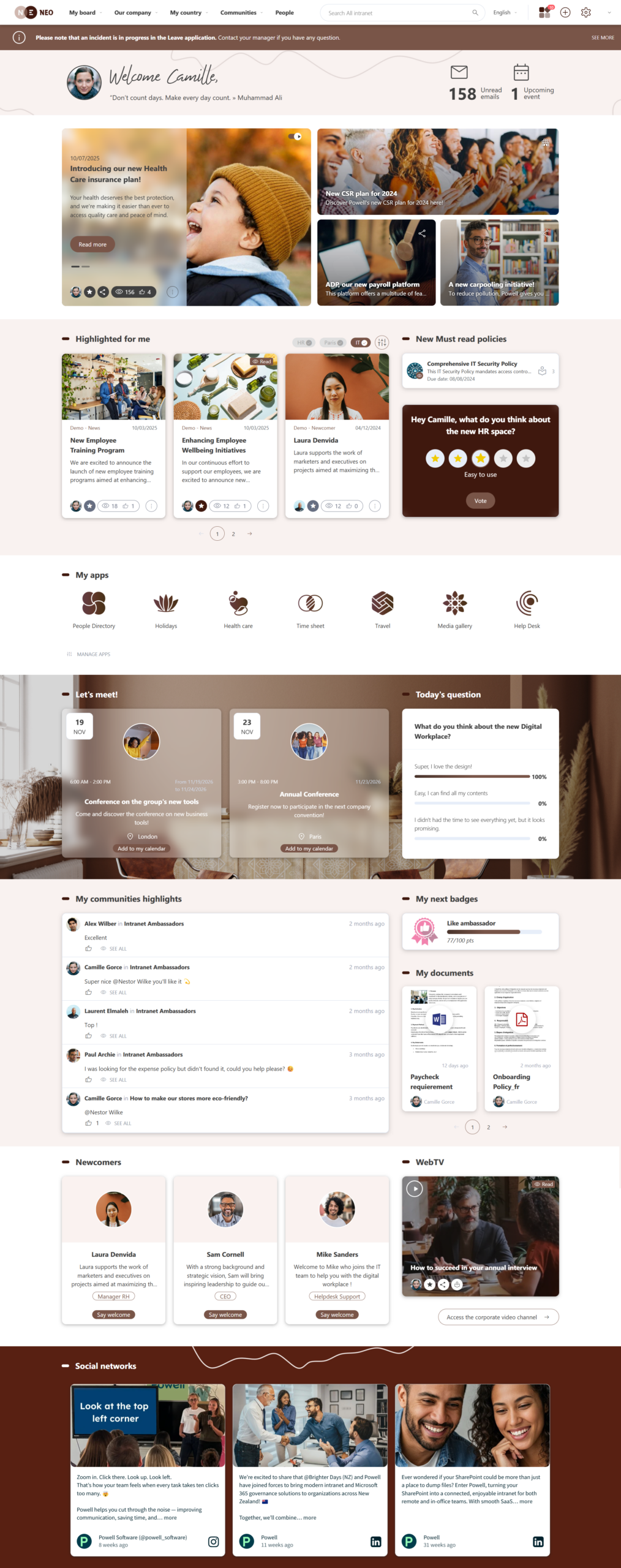
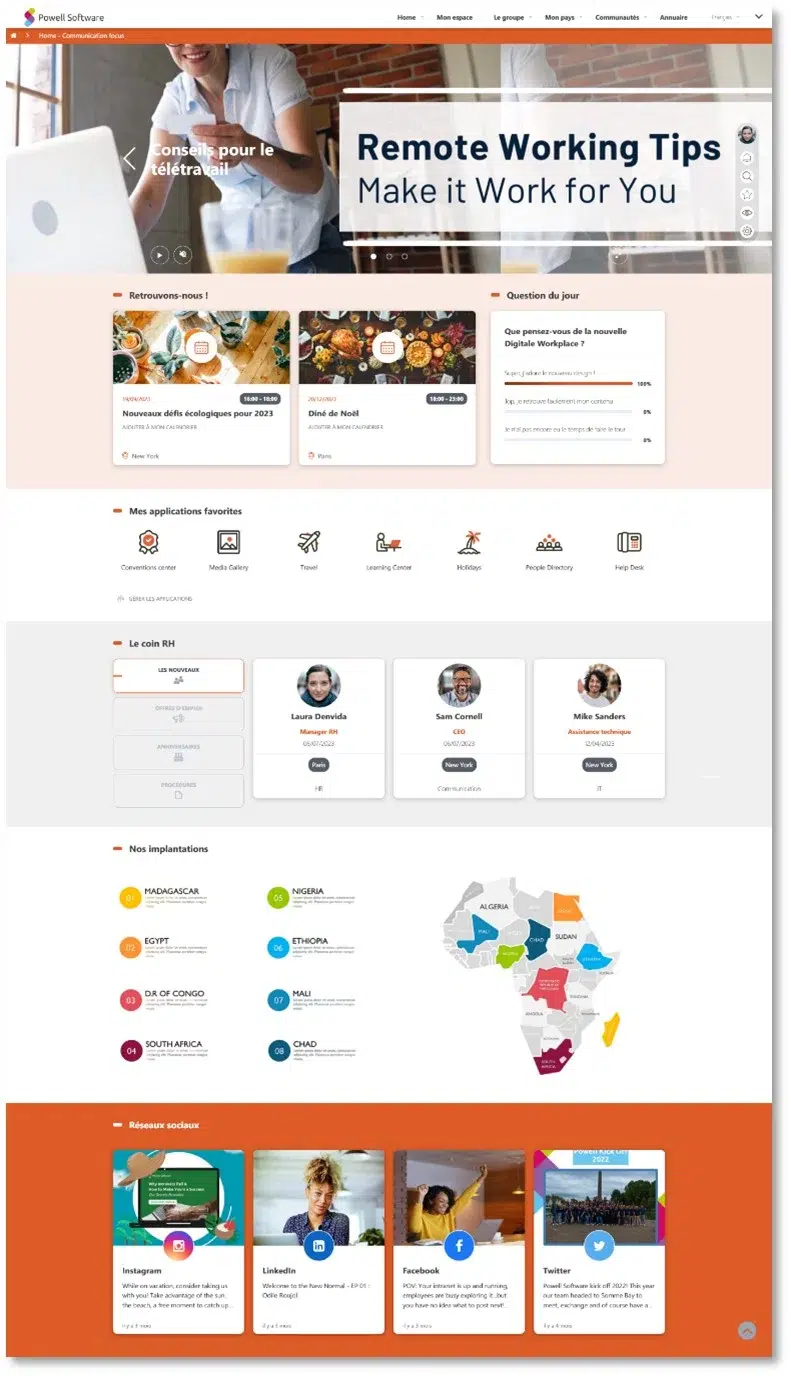
By rebuilding their SharePoint intranet homepage with Powell’s pre-designed templates and drag-and-drop web parts, the communications team created a centralized hub that worked for everyone:
- A modern homepage design with personalized content feeds tailored to each employee’s role and location
- Targeted news delivery by department using audience targeting built into SharePoint online
- Quick-access navigation to HR tools, the company directory, and key documents, everything easy to find in two clicks or fewer
- A social feed integration for informal recognition and peer engagement
- A dynamic FAQ section that reduced repetitive support requests
- Full mobile responsiveness for deskless and field-based workers
Results & business impact
News article readership increased significantly. Time spent searching for information dropped. Employee satisfaction scores improved, and the communications function shifted from reactive and administrative to genuinely strategic.
Example #2 : SharePoint intranet example for HR
The challenge: HR overwhelmed by repetitive questions
A service-sector company with high employee turnover was facing a productivity crisis inside its HR department. The team spent 15+ hours per week fielding recurring questions about payroll, benefits, and time-off policies. Critical HR documents were buried deep in their SharePoint intranet site, and outdated versions kept circulating through email long after they’d been replaced.
The solution: A self-service HR portal on SharePoint
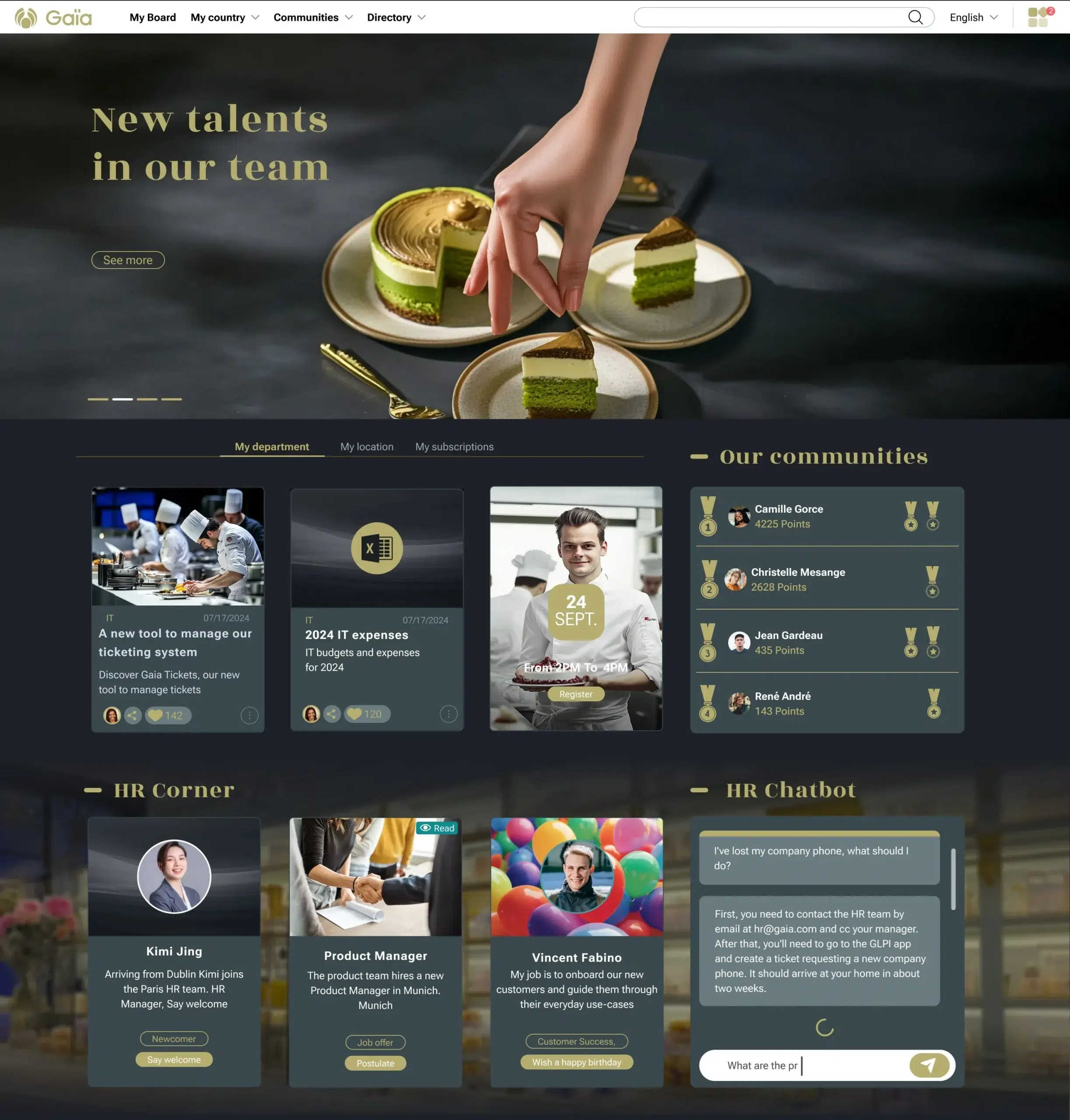
Using Powell’s configuration layer over SharePoint online, the company built a self-service HR experience that empowered employees to find answers on their own:
- A personalized employee dashboard surfacing each person’s relevant HR documents at a glance
- An AI-powered chatbot answering policy and benefits questions 24/7, directly within the intranet
- Gamification elements encouraging onboarding completion and formal policy acknowledgment
- A centralized document library with automatic expiry for outdated content, eliminating version confusion
- An HR community section with team contacts and department resources
- Full integration with Microsoft 365 tools that employees already use daily
Results & business impact
HR support ticket volume dropped substantially. The chatbot resolved most common queries without human intervention. The HR team was able to redirect its energy toward talent development, culture building, and retention initiatives.
This is a clear example of SharePoint intranet transformation where self-service isn’t just a feature. It’s a measurable cultural shift.
Example #3 : SharePoint intranet example for company culture & recognition
The challenge: Eroding culture in a fast-growing company
A tech company that scaled from 300 to 800 employees in just 18 months was losing the culture that had defined its early success. Remote teams felt disconnected. Achievements went unnoticed. There was no central place to celebrate wins, share employee stories, or reinforce the values that made the company what it was.
The solution: A culture-first SharePoint intranet
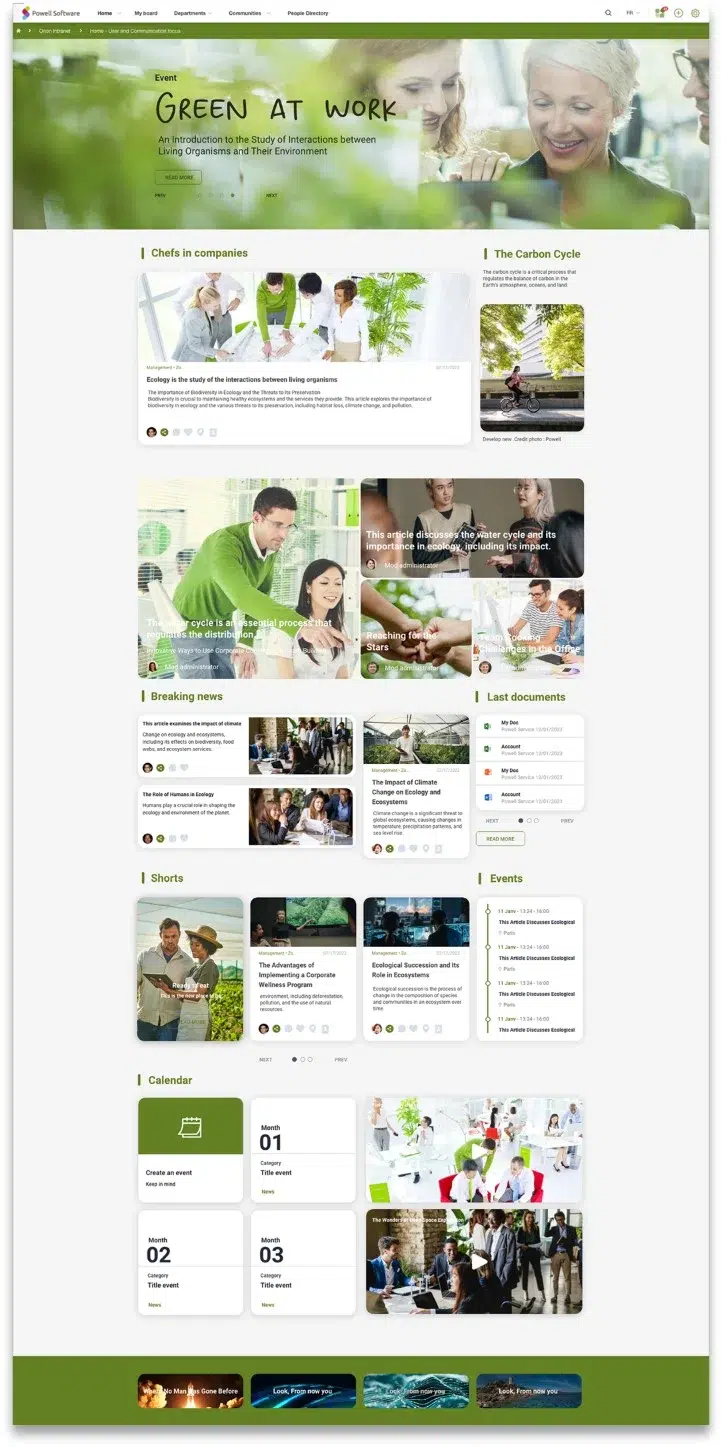
Helpe the company to transform their modern intranet into a living expression of company identity:
- A dynamic SharePoint intranet homepage featuring company values, team wins, and employee spotlights
- A Recognition Wall (Kudos system), where employees publicly thank colleagues, visible across all intranet sites
- A badge and leaderboard system gamifying positive behaviors such as innovation, collaboration, and customer service
- An event calendar integrated with Outlook for team-building events, onboarding sessions, and CSR activities
- Video testimonials from employees, embedded directly in intranet pages
- Integration with Viva Connections for seamless mobile access to culture content across any device
Results & business impact
Kudos engagement grew significantly. Employee Net Promoter Score improved. Event participation increased. And critically, remote employees reported a measurably stronger connection to the company’s mission.
Example #4 : Collaborative SharePoint intranet for cross-functional teams
The challenge: Siloed teams struggling with hybrid work
A large enterprise running complex, cross-functional projects was losing time and momentum to structural inefficiency. Files were scattered across Teams channels, emails, and disconnected SharePoint sites. Version control was a constant headache. Too many meetings existed simply to compensate for the absence of shared, reliable information.
The solution: A unified collaboration hub on SharePoint
Build a connected workspace that brought every project, team, and resource into one coherent experience:
- Dedicated project workspaces with task management, shared documentation, and live activity feeds
- A contextualized homepage showing each user’s active projects, relevant updates, and pending tasks, making everything easy to find without searching
- Seamless Microsoft 365 integration across Teams, Planner, and SharePoint document libraries within a single interface
- Unified search across all SharePoint sites, project spaces, and document libraries
- Permission-based access ensuring security without creating friction for day-to-day collaboration
- Real-time notifications for project updates, reducing the need for status check-in meetings
Results & business impact
Status meetings dropped. Document retrieval time fell from an average of 8 minutes to under 1 minute. Cross-team collaboration scores improved. Project completion velocity increased.
Why Powell is the best way to transform SharePoint
These four SharePoint intranet examples share one critical thing: none of them required starting from scratch, hiring a development team, or replacing SharePoint with something else.
All four were built with Powell Intranet, a solution designed to unlock the full potential of SharePoint online without the complexity, the timelines, or the IT overhead.
Built ON SharePoint, not instead of it
Powell layers directly on top of your existing SharePoint infrastructure. No data migration. No new platform to learn. No compromise on Microsoft 365 governance, permissions, or security. Your SharePoint sites remain exactly as they are, and they just look and function infinitely better.
Designed for business users, not developers
One of the most persistent pain points in any sharepoint intranet project is IT dependency. Business teams have content to publish and pages to update, but every change requires a ticket. Powell solves this with an intuitive admin interface that puts control back in the hands of communications, HR, and operations teams. Every customer is also supported by a dedicated Customer Success Manager and a full library of training resources to accelerate adoption.
Proven results across industries
Powell has been deployed in 600+ organizations, supporting more than 2 million active users globally through a network of 72+ local partners. From retail to financial services to manufacturing, the pattern across every example of SharePoint intranet modernization is consistent: purpose-built design, combined with the right structure, delivers adoption rates that out-of-the-box SharePoint simply cannot match.
Continuous innovation
Powell evolves in lock-step with Microsoft. Regular updates track new Microsoft releases, and AI-powered features, including intelligent search and content suggestions, are already integrated into the platform. Viva Connections compatibility ensures that employees on mobile enjoy the same quality of experience as those on desktop.
Whether you’re looking to build an intranet from scratch or modernize what you already have, Powell compresses a journey that typically takes months into a matter of weeks.
Want to see a real-world success story ? Watch how Brown’s Shoes built a single source of truth for their entire workforce using Powell Intranet →
Conclusion
The four SharePoint intranet examples covered here aren’t outliers. They represent what is achievable for any organization willing to rethink how their intranet is designed, structured, and maintained.
From centralized communications to self-service HR, from culture-first intranets to unified collaboration hubs, modern intranet transformation is proven, measurable, and far faster to deliver than most teams expect.
The common thread across every example? Each organization stopped treating their SharePoint environment as a document repository and started treating it as a strategic employee experience platform. And each used Powell to get there, without walking away from their existing Microsoft 365 investment.
If you’re ready to build an intranet that employees actually use, start where the proof is.

Jordan Washington
Regional Marketing Manager