The quick answer
Choose Infodash if you are a large law firm that wants one platform for the internal intranet and the client-facing extranet, with firm data such as directories, calendars and matter data in one hub.
Choose Powell if Microsoft 365 is your foundation and you want one platform that gives employees a digital workplace they actually use, gives IT governance over SharePoint and Teams, and gets your content ready for Copilot.
Infodash vs Powell at a glance
✓ Included ◐ Partly, or a different approach ○ Not offered
| Capability | Powell | Infodash |
|---|---|---|
| Built natively on Microsoft 365 | ✓ Runs on SharePoint | ✓ Built on SharePoint Online |
| Content stays in your Microsoft 365 tenant | ✓ Your tenant, your permissions | ✓ In your SharePoint Online |
| Works with Google Workspace | ○ Microsoft 365 only | ○ Microsoft 365 only |
| Targeted, multi-channel communications | ✓ Intranet, Teams, email, mobile | ✓ Targeted news and events |
| Search that shows owner and last update | ✓ Owner and date on every result | ◐ Ethical wall-aware AI search |
Want to see the Powell column on your own Microsoft 365? Book a demo, or estimate your intranet ROI first.
What is Infodash?
Infodash is a unified intranet and extranet platform designed for large law firms, including Am Law 200 and Global 100 firms. It is built on SharePoint Online and integrated with Microsoft Teams, and it synchronizes data between internal and external workspaces.
Infodash is best known for:
- One platform for the internal intranet and the client-facing extranet
- A hub for data from other systems, such as financial data, firm directories, calendars, news, and client and matter data
- Integration with SharePoint and Teams, legal systems such as NetDocuments and Aderant, and a listing as an iManage technology partner
- Quick deployment and customization, with automated provisioning and governance for extranet sites
What is Powell?
Powell is a digital workplace platform built natively on Microsoft 365. It turns SharePoint, Teams and the rest of Microsoft 365 into a digital workplace employees actually use, and gives IT the governance and AI readiness that Microsoft 365 needs. It’s one platform for the intranet, the governance of SharePoint and Teams, and the content Copilot draws on.
Powell is best known for:
- Communications that reach people on the intranet, in Teams, by email and on mobile, with built-in analytics
- HR and IT self-service built into the intranet
- Search that shows who owns each result and when it was last updated
- Real-time visibility and automated governance across SharePoint and Teams
The core difference: two approaches to the digital workplace
Infodash and Powell both build on Microsoft 365, so the difference is focus.
Infodash is built for large law firms. It joins the internal intranet and the client extranet in one platform and pulls in firm and matter data.
Powell builds the digital workplace inside Microsoft 365. It runs on SharePoint, Teams and the permissions you already manage. The intranet, the governance of SharePoint and Teams, and the content Copilot draws on sit in one platform, not in separate tools.
Both keep you on Microsoft 365. The right one depends on whether you want a platform shaped around a law firm’s intranet and extranet, or a digital workplace that governs SharePoint and Teams across your tenant.
How Infodash and Powell compare, criterion by criterion
Microsoft 365 fit and where your data lives
Infodash is built on SharePoint Online and integrated with Microsoft Teams. Legal Technology Hub reports that it is deployed inside the firm’s own Microsoft tenant, with governance settings inherited from the firm’s Microsoft 365 policies.
Powell runs on SharePoint. Pages, news and documents stay in your Microsoft 365 tenant, under the permissions IT already manages. One place holding your content, one permissions model to look after, and no second platform to secure.
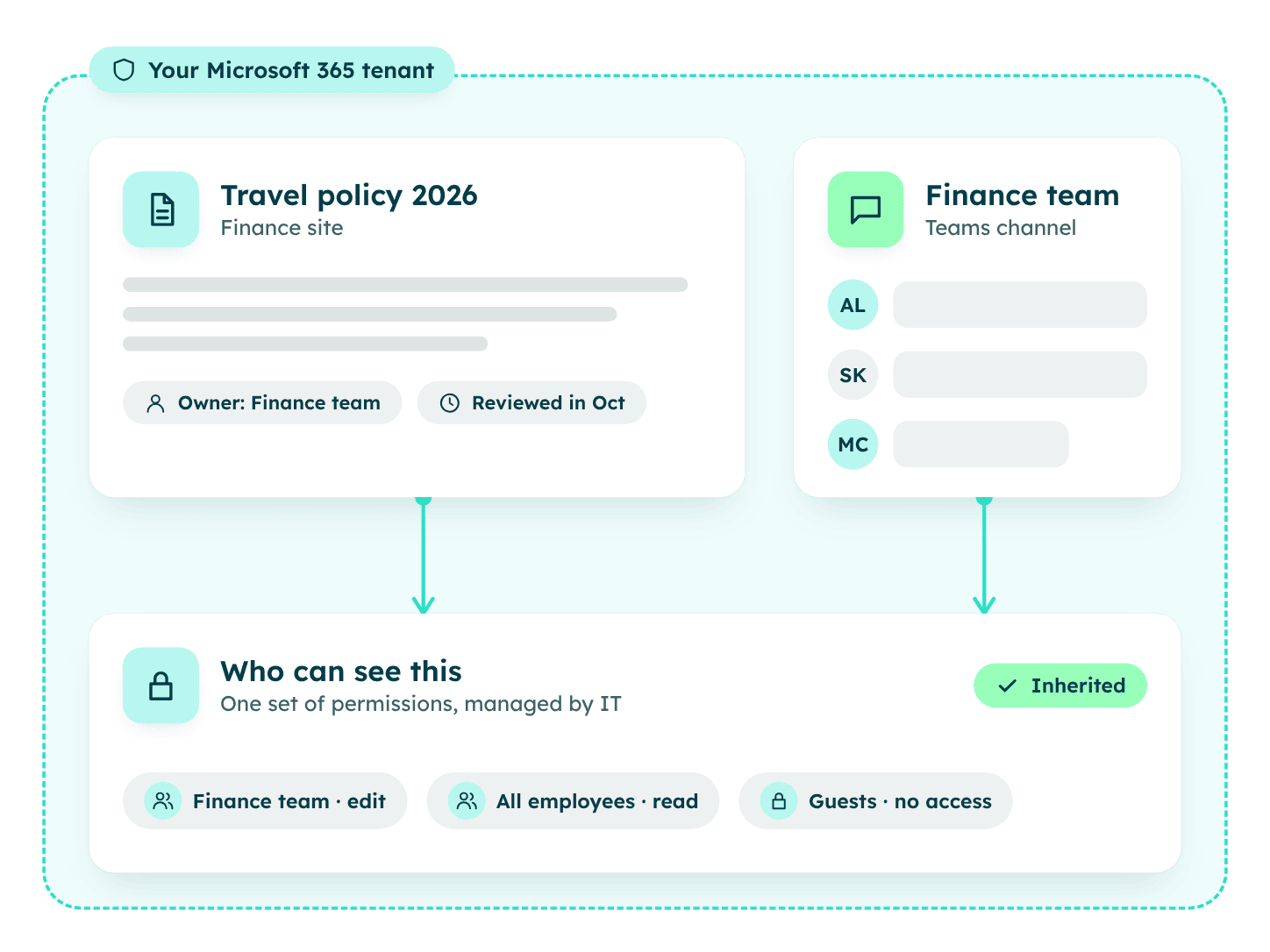
In short: both keep you on Microsoft 365, so the difference sits in what each platform covers.
Communications: getting messages to land
Infodash keeps lawyers and staff informed about firm news and events, tailored by role, practice group and location, and helps them collaborate with colleagues, including while working remotely.
Powell gives comms one place to publish, target and translate messages, then share them across the intranet, Teams, email and the mobile app, with push notifications for critical announcements. Comms teams can track views and engagement for each message.
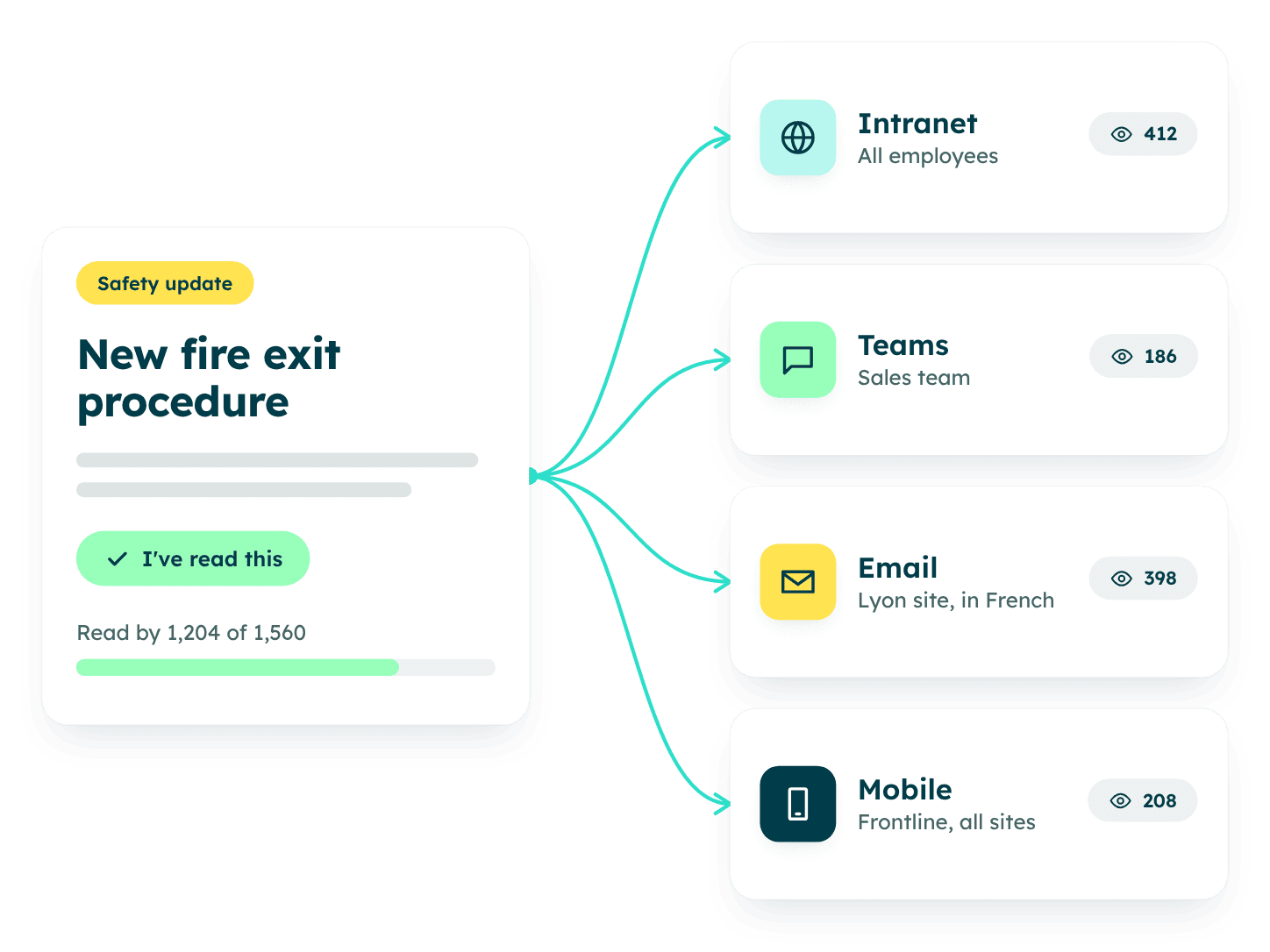
In short: both keep people informed. Infodash tailors firm news by role, practice group and location; Powell shares each message across the intranet, Teams, email and mobile.
Knowledge and search: finding answers people trust
Infodash brings firm directories, calendars, news and matter data from other systems into one hub, so people find information in one place. Its AI search is ethical wall-aware and surfaces people, matters, documents and firm knowledge.
Powell handles the way people actually search: plain questions, synonyms and typos, with people, documents and pages in one set of results. Every result shows who owns it and when it was last updated, so employees can tell this year’s travel policy from the one written in 2019. More on this in our guide to knowledge management best practices.
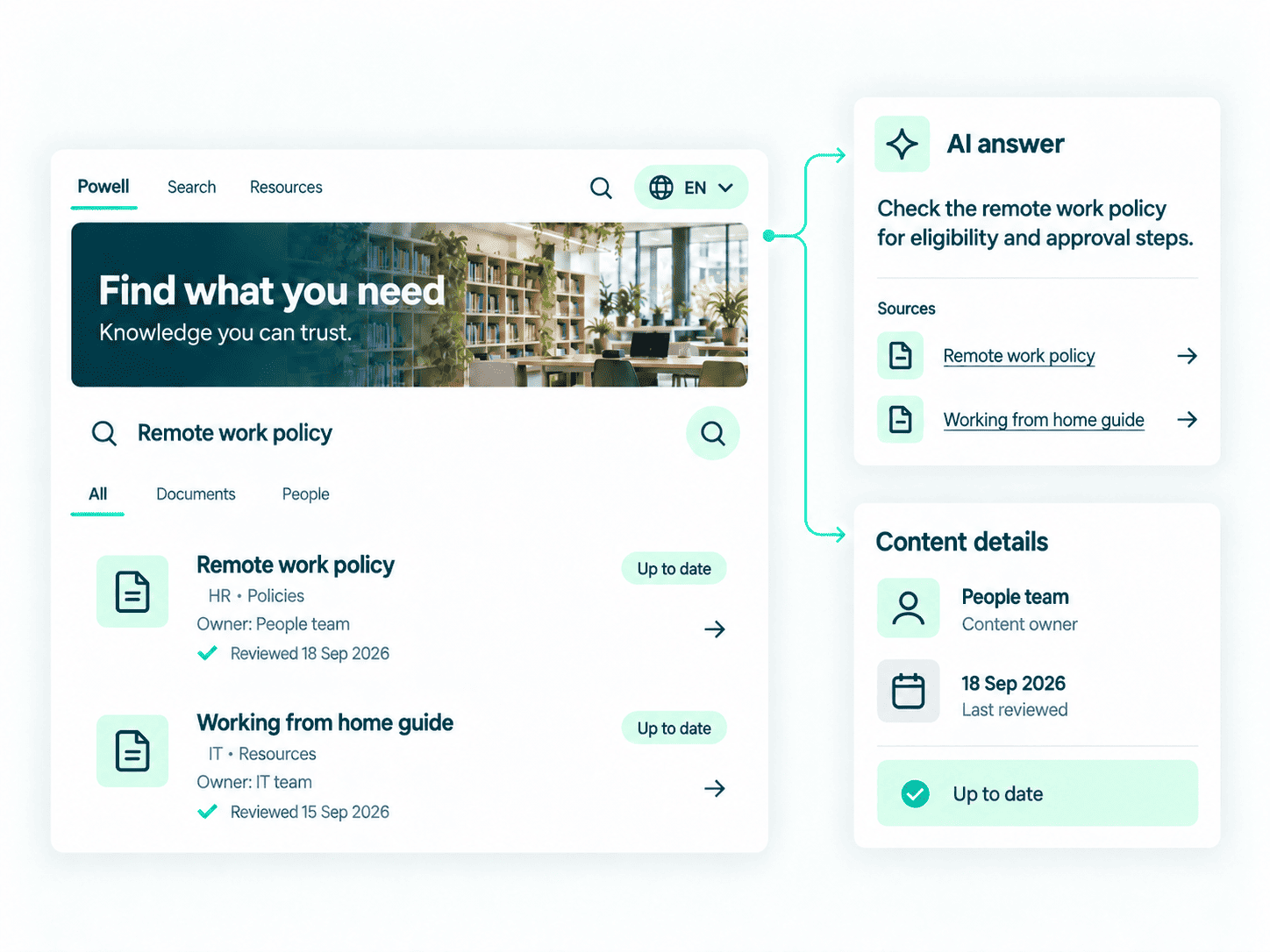
In short: Infodash brings firm data and ethical wall-aware search together. Powell adds owner and last-updated labels on every result.
Which platform fits your priorities?
Read across the row that matters most to you.
| Priority | Infodash fits best when | Powell fits best when |
|---|---|---|
| Internal and client collaboration | You want the intranet and the client extranet in one platform | You want the intranet on SharePoint, governed with the rest of the tenant |
| Where content lives | Content sits in SharePoint Online | Content and permissions stay in your tenant |
| Internal communications | You want firm news and events targeted by role, practice group and location | You want messages shared across the intranet, Teams, email and mobile, with views tracked per message |
| Firm data | You want directories, calendars and matter data in one hub | You want people, documents and pages in one set of results |
| Search and knowledge | You want ethical wall-aware search across firm systems | You want search that shows owner and last update on every result |
Ready to see Powell on your own Microsoft 365?
Pricing and implementation
Powell prices per user, in three tiers that build on each other, with a customer success team included. Some organizations launch in a few days; for 1,000+ employees, building the intranet with its content typically takes about four months.
Infodash doesn’t publish pricing on the public pages we reviewed.
Whichever you evaluate, ask the same three questions: what’s included in the subscription (implementation, support, updates), what drives the price up (users, modules, integrations), and who does the work on launch day.
Questions to ask in your demo
Demos are rehearsed. These questions take any vendor off script, Powell included.
- Where is our intranet content stored, and who manages its permissions?
- Show us a message going to one audience on the intranet, in Teams, by email and on mobile. How do we see who read it?
- Search for a policy that exists in two versions. Which one comes first, and how can an employee tell?
- How do you keep the client extranet in sync with the internal intranet, and how do you govern the SharePoint sites and Teams around both?
- What happens to outdated or overshared content before Copilot or your AI can read it?
- Walk us through an HR request from start to finish.
- What can comms update on the homepage themselves, and what needs IT?
- What’s in the subscription, and what costs extra?
Switching from Infodash to Powell
Both platforms run on Microsoft 365, so your content, identity and permissions are already in place. That gives you a head start.
- Audit before you move. List what’s actually used and archive the rest. Powell’s governance tools show who owns what across SharePoint and Teams.
- Decide what moves. Pages, news and documents already live in your Microsoft 365 environment. Decide what to keep, archive or rebuild in Powell’s templates. Files already in SharePoint and OneDrive stay where they are.
- Keep your identity setup. Employees sign in with Microsoft 365 single sign-on, so users, groups, and permissions stay in one place.
- Launch in phases. Start with corporate teams to set the structure and governance, then bring everyone else on board.
- Bring in a partner. Powell’s certified partners in North America run design workshops, adapt the templates to your needs, and support your rollout.
Final verdict
Infodash is a strong choice for large law firms that want the internal intranet and the client extranet in one platform.
For organizations where Microsoft 365 is the foundation, Powell brings what IT, comms and HR need together in one platform: an intranet people use, governance over SharePoint and Teams, and content ready for Copilot, all on the stack you already run.
Frequently asked questions
What is the main difference between Infodash and Powell?
▾
Infodash is a unified intranet and extranet platform designed for large law firms, built on SharePoint Online. Powell is a digital workplace platform built natively on Microsoft 365, with intranet, governance and Copilot readiness in one platform and content kept in your tenant.
Is Infodash built on SharePoint?
▾
Yes. Infodash is built on SharePoint Online and integrated with Microsoft Teams. Powell is also built natively on Microsoft 365 and SharePoint, with intranet, governance and Copilot readiness in one platform.
Does Infodash keep content in my Microsoft 365 tenant?
▾
Yes, according to Legal Technology Hub: Infodash is deployed inside the firm’s own Microsoft tenant, with governance settings inherited from the firm’s Microsoft 365 policies. Powell also keeps pages, news and documents in your tenant, under permissions IT already manages.
Does Powell work with Google Workspace?
▾
No. Powell is built for organizations that run on Microsoft 365. If Google Workspace is your main suite, a platform that connects to it is the better fit.
Which is better for frontline workers?
▾
Infodash focuses on lawyers and staff across the intranet and client extranet, so ask in your demo how it serves people away from a desk. Powell’s mobile app connects frontline and support staff to the rest of the firm, with the same news and intranet content as their colleagues and instant push notifications for critical announcements.
How much do Infodash and Powell cost?
▾
Both work on quotes. Infodash doesn’t publish prices on its public pages. Powell prices per user, across three tiers.
Can Powell help us prepare for Microsoft Copilot?
▾
Yes. Copilot answers from what’s in your Microsoft 365. Powell helps make sure that content is owned, current and correctly permissioned, so Copilot answers from knowledge you trust.
What are the best Infodash alternatives for Microsoft 365 organizations?
▾
Look for platforms built on Microsoft 365, so content, identity and permissions stay in your tenant. Powell is one; Microsoft’s own SharePoint and Viva are another starting point.
We could brag. They said it better.
Real teams, real Microsoft 365 rollouts, straight from G2. Read all Powell reviews on G2


Done comparing?
Let’s talk, human to human.
Bring your Microsoft 365 setup, your shortlist and your toughest questions, and we’ll talk through what would actually work for your teams.


Nadim Faour
Junior Field Marketing Manager