
What is a digital workplace?
At its simplest, a digital workplace is the virtual equivalent of your physical office, but far more powerful. It’s where employees go to access everything they need: company news, HR services, project collaboration, training resources, and the business applications that drive daily work. Unlike a traditional office, the digital workplace is available 24/7, accessible from anywhere, and tailored to each employee’s role and location.
A simple definition of the digital workplace
The digital workplace is an integrated digital environment that connects people, processes, and technologies to enable productive, engaging work, regardless of physical location.
It sits at the intersection of three elements:
- People: Employees across all levels, from frontline workers to executives, and their need for information, connection, and tools.
- Processes: The workflows, policies, and journeys that structure how work gets done (onboarding, approvals, knowledge sharing, service requests).
- Technologies: The platforms and applications that power communication, collaboration, and business operations.
Concrete scenario: Imagine Sarah, a compliance manager at a multi-state healthcare organization. She starts her day on the digital workplace homepage, where she sees targeted news about a new HIPAA update relevant to her region. She clicks through to a governance community where colleagues are discussing implementation. She submits a policy review request through an embedded workflow, searches the knowledge base for the latest audit checklist, and joins a Teams meeting, all without leaving the digital workplace environment. No hunting through email, no wondering which SharePoint site holds the right document, no friction.
Digital workplace vs. digital workspace
These terms are often confused, but the distinction matters:
Digital WorkPLACE: the company-wide ecosystem. It’s the architecture, governance, content, and tools that serve the entire organization.
Digital WorkSPACE: the individual’s personalized view. It’s the homepage, dashboard, shortcuts, and apps configured for one person’s role and preferences.
Example: Your organization’s digital workplace might include a global news hub, departmental portals for HR and IT, dozens of project Teams, and integrated business applications. But when Sarah logs in, her digital workspace shows her compliance-related news, her active projects, her pending approvals, and quick links to the tools she uses daily. Same foundation, personalized experience.
Digital workplace, intranet and employee experience platforms
The digital workplace isn’t just a rebranded intranet, though the two are related. Here’s how they fit together:
- Classic intranet (1990s–2010s): A top-down publishing platform for company news and policies. One-way communication, limited interactivity, often outdated.
- Digital workplace (2010s–present): An integrated environment that adds collaboration, business apps, self-service, communities, and governance. Two-way engagement, personalized, always evolving.
- Employee Experience Platform (EXP) (emerging): A layer focused on orchestrating the entire employee journey: onboarding, development, recognition, offboarding, often with AI-driven personalization and sentiment analysis.
The relationship: The intranet is a component of the digital workplace, specifically the communication and information hub. The digital workplace is broader, encompassing collaboration, apps, and governance. An EXP takes it further by actively shaping employee journeys and experiences.
Before going any further, it’s worth clarifying the classic intranet vs internet distinction: the internet is the public web accessible to anyone; an intranet is a private network accessible only to an organization’s employees. The digital workplace builds on the intranet concept but extends far beyond static pages to include dynamic collaboration, real-time communication, and integrated business processes.
Short video presenting the new Digital Workplace solution for SharePoint
Why the digital workplace has become strategic
A decade ago, the digital workplace was an IT project, nice to have, but not mission-critical. Today, it’s a strategic lever for business performance, talent retention, and operational resilience. Several forces have converged to make this shift inevitable:
- Hybrid work is the new default: 74% of US companies have adopted or plan to adopt permanent hybrid work models (McKinsey, 2023). Employees expect seamless experiences whether they’re at headquarters, home, or a branch office.
- Talent shortage and retention pressure: with unemployment near historic lows in many sectors, employee experience is a competitive differentiator. A fragmented, frustrating digital environment drives turnover.
- Compliance and security demands: regulated industries face mounting pressure to demonstrate data governance, access control, and auditability, especially in healthcare (HIPAA), finance (SOX, FINRA), and public sector (FedRAMP, state regulations).
- Productivity expectations: leaders demand more output with leaner teams. Yet employees waste 20% of their time searching for information or chasing approvals (IDC, 2022). The digital workplace is the antidote.
Supporting hybrid work and distributed teams
The digital workplace is the connective tissue for organizations with multiple locations: headquarters, regional offices, manufacturing plants, retail stores, and remote workers.
Concrete scenarios:
- Remote onboarding: A new hire in Austin joins a company headquartered in Boston. The digital workplace delivers a personalized onboarding portal with welcome videos, role-specific training, team introductions, and a checklist. No need to ship a binder or rely on email.
- Cross-timezone collaboration: A product launch involves teams in New York, Chicago, and Los Angeles. The digital workplace hosts a dedicated project space with shared documents, asynchronous updates, recorded meetings, and a timeline, keeping everyone aligned without endless Zoom calls.
- Frontline access: Nurses, retail associates, and field technicians don’t have corporate email or dedicated desks. The digital workplace’s mobile app gives them shift briefings, safety checklists, policy updates, and a channel to share feedback, finally giving frontline workers a voice.
Smoother internal communication and access to information
Email overload is real: the average knowledge worker receives 120+ emails per day. Teams channels proliferate, creating new silos. Important announcements get buried, and employees miss critical updates.
A structured digital workplace solves this by:
- Targeted content delivery: News and updates reach the right audience (by role, location, department) instead of blasting everyone.
- Reduced noise: Employees see what matters to them, not everything.
- Better search: Unified search across SharePoint, Teams, and business apps means finding the right document in seconds, not minutes.
| Before digital workplace | After digital workplace |
|---|---|
| HR policy update sent via all-company email, 12% open rate | HR policy published on digital workplace with role-based targeting, 68% read rate |
| Employees search 3+ places (email, SharePoint, Teams) to find a form | Single search bar returns the form, related policies, and a how-to video |
| Important CEO message lost in inbox clutter | CEO message pinned on homepage with video, comments enabled, 89% engagement |
Better employee experience and stronger engagement
The digital workplace isn’t just about efficiency. It’s about culture and connection.
Impact on key moments:
- Onboarding: New hires access a welcome portal with their manager’s intro, team bios, first-week tasks, and company values, reducing time-to-productivity by 30% (based on Powell customer data).
- Recognition: Employees celebrate wins, anniversaries, and peer shout-outs in a social feed, making recognition visible and reinforcing culture.
- Transparency: Leadership shares strategy updates, Q&A sessions, and town halls in a central hub, building trust and alignment.•
- Community: Employees join communities of practice (e.g., project managers, diversity & inclusion, sustainability champions) to share knowledge and build networks beyond their immediate team
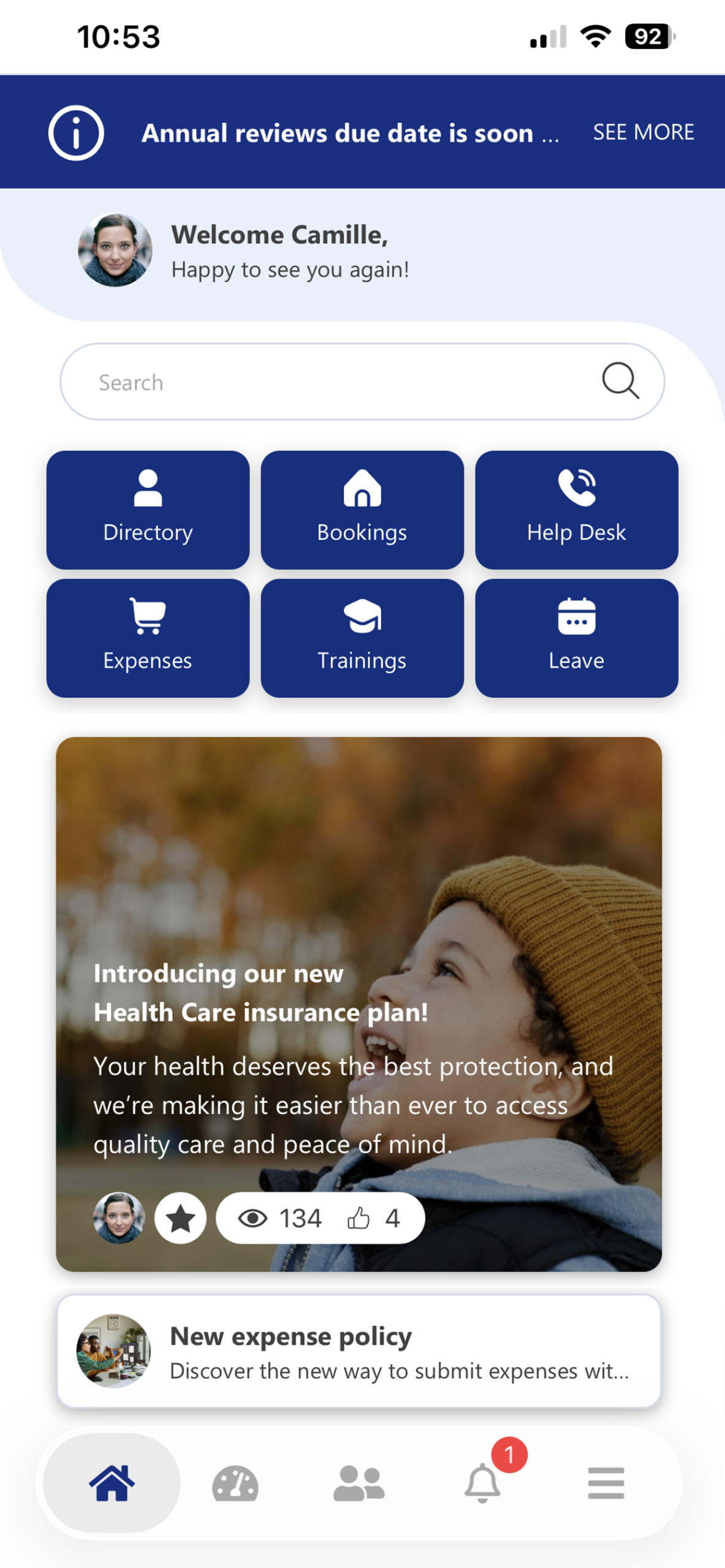
Example of a Digital Workplace dashboard with Powell Intranet
What are the core components and technologies of a digital workplace?
A successful digital workplace isn’t a single platform. It’s an orchestrated ecosystem. Here are the essential building blocks:
Communication and corporate information
This is the “intranet” layer: where leadership communicates strategy, HR shares policies, and departments publish updates.
- •News and announcements: Targeted by audience (e.g., all employees, managers only, specific locations).
- •Internal newsletters: Curated digests delivered via email or mobile push.
- •Video channels: CEO messages, training videos, event recordings.
- •Portals: Dedicated hubs for HR, IT, Safety, Compliance, etc.
A modern digital workplace supports integrated communication, where leadership messages, local news, and HR updates are orchestrated in one place instead of scattered across email, Teams, and SharePoint sites.
✅ Best practice: Enable decentralized publishing (let departments and locations create content) while maintaining governance (templates, approval workflows, brand guidelines).
Quest Diagnostics
Quest Diagnostics unified communications for 46,000 employees across global locations by replacing scattered emails and disparate sites with a single intranet hub, giving every employee access to targeted, relevant content in one place and enabling two-way dialogue between staff and leadership.
Collaboration, projects and communities
This is where work happens: Teams channels, SharePoint project sites, communities of practice, and forums.
- •Project spaces: Dedicated environments for cross-functional initiatives, with documents, tasks, meetings, and timelines.
- •Communities: Self-organized groups around topics (e.g., innovation, wellness, technical skills) that foster knowledge sharing and networking.
- •Templates: Standardized structures for common scenarios (project kickoff, department site, community) to avoid chaos and ensure consistency.
Pharma use case
A pharmaceutical company creates a “Clinical Trials Community” where researchers across sites share protocols, discuss regulatory changes, and collaborate on submissions, reducing duplication and accelerating time-to-market.
See more about how we help the healthcare industry here.
Governance tip: Without usage rules and templates, collaboration spaces proliferate uncontrollably. Define who can create what, when spaces should be archived, and how to keep permissions under control.
Business applications, self-service and automation
The digital workplace becomes the front door to your core systems: HRIS (Workday, SAP SuccessFactors), CRM (Salesforce), ITSM (ServiceNow), ERP, and line-of-business apps.
- •Embedded apps: Employees access HR services, IT support, facilities requests, and purchasing without leaving the digital workplace.
- •Self-service workflows: Submit time-off requests, expense reports, access requests, or equipment orders through guided forms.
- •Automation: Approvals, notifications, and status updates happen automatically, reducing manual work and errors.
User journey example: Time off request in under 2 minutes.
- Employee clicks “Request Time Off” on the digital workplace homepage.
- A form pre-filled with their manager and remaining PTO balance appears.
- They submit; the request routes to their manager in Teams.
- Manager approves with one click; HR system updates automatically.
- Employee receives confirmation and calendar invite.
Knowledge management and search
Knowledge is fragmented: documents in SharePoint, conversations in Teams, policies in PDFs, tribal knowledge in people’s heads. The digital workplace brings it together.
- •Unified search: One search bar that queries SharePoint, Teams, OneDrive, and connected apps.
- •Taxonomies and metadata: Structured tagging (by department, topic, document type) that makes content findable.
- •Knowledge bases: Curated repositories for FAQs, how-to guides, troubleshooting, and best practices.
- •Content lifecycle: Automated review reminders, archiving of outdated content, and version control.
Identity, security and governance
Behind the scenes, the digital workplace relies on robust identity management, access control, and governance.
- •Single sign-on (SSO): Employees authenticate once (e.g., via Azure AD) and access all apps seamlessly.
- •Role-based access: Permissions tied to job roles, locations, and security groups, ensuring employees see only what they should.
- •Workspace lifecycle: Automated provisioning, renewal reminders, and archiving of inactive Teams and SharePoint sites.
- •Audit trails: Logs of who accessed what, when. Critical for compliance in regulated industries.
This foundation is especially important for intranet management: as your digital workplace scales, strong governance keeps sites, permissions, and content under control. Without it, you face “SharePoint sprawl,” security risks, and compliance headaches.
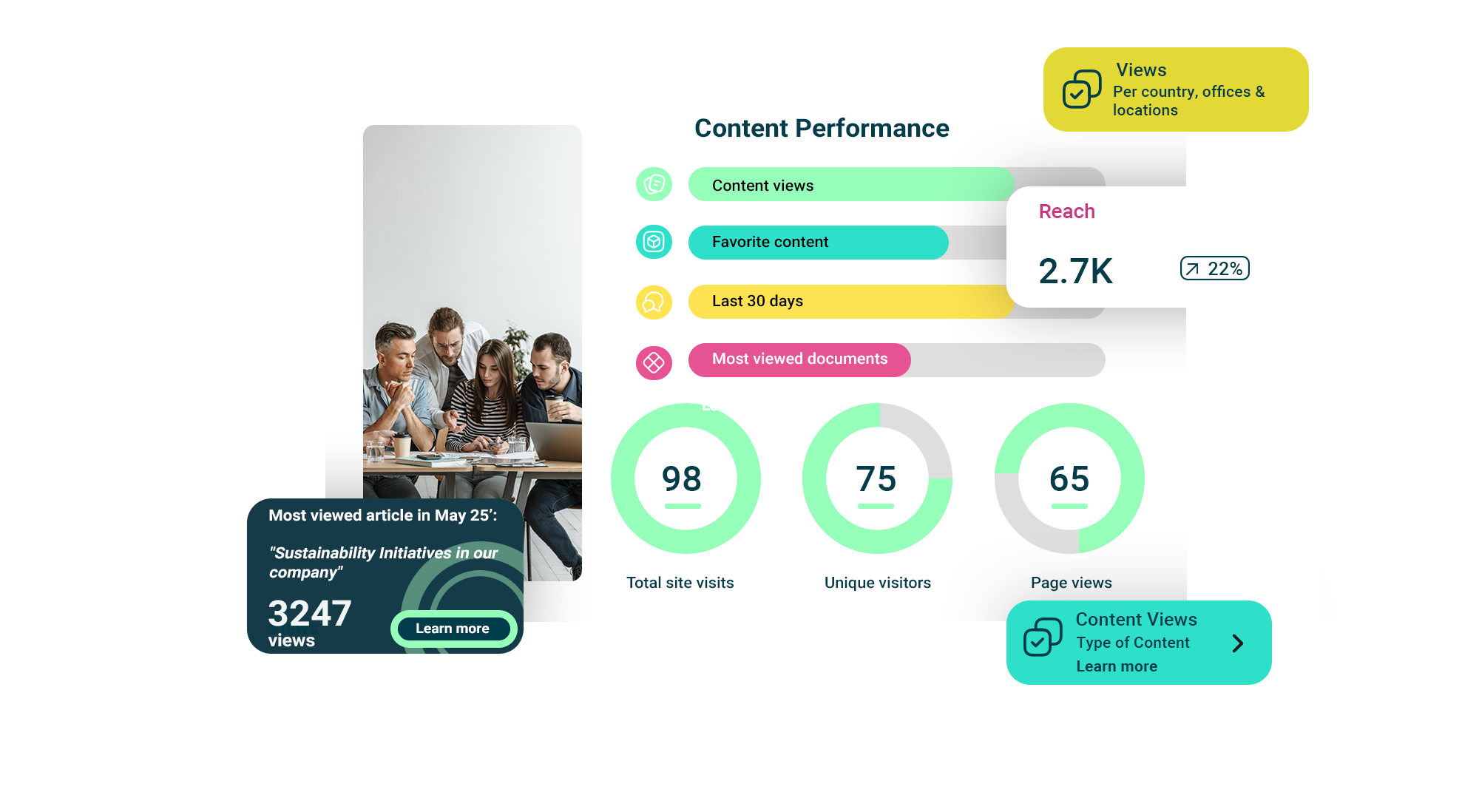
Example of a Digital Workplace analytics dashboard
What are the key benefits of a successful digital workplace?
The digital workplace delivers value across multiple dimensions: for employees, managers, IT, and business leaders.
Reducing digital friction and boosting productivity
Digital friction is the cumulative drag of multiple logins, tool overload, duplicate files, and unclear processes. It’s death by a thousand clicks.
A well-designed digital workplace reduces friction through:
- •Single entry point: One homepage that surfaces news, tasks, apps, and search.
- •Guided journeys: Step-by-step workflows for common tasks (onboarding, offboarding, service requests).
- •Efficient search: Find the right document, person, or answer in seconds.
Strengthening engagement and company culture
The digital workplace gives employees a voice and showcases culture in action.
- •Comments and reactions: Employees engage with news, ask questions, and share perspectives, turning one-way announcements into conversations.
- •Polls and idea boxes: Leadership gathers feedback on policies, initiatives, and workplace improvements.
- •Stories and wins: Teams share project successes, customer testimonials, and employee spotlights, making achievements visible and reinforcing values.
- •Events and recognition: Celebrate milestones, birthdays, work anniversaries, and peer recognition in a social feed.
Making access to services and apps easier
Employees shouldn’t need to remember which portal handles time-off requests, which system tracks training, and which form to use for IT support. The digital workplace consolidates everything.
- •HR services: Benefits enrollment, pay stubs, performance reviews, career development, all in one place.
- •IT support: Submit tickets, check status, access self-help articles, request software.
- •Facilities: Book conference rooms, report maintenance issues, request office supplies.
- •Training: Browse courses, track certifications, register for workshops.
Improving governance, compliance and security
For IT leaders and regulated industries, the digital workplace is a governance and compliance enabler.
- •Better access control: Role-based permissions ensure sensitive data (patient records, financial reports, legal documents) is protected.
- •Lifecycle management: Automated provisioning and archiving prevent abandoned Teams and SharePoint sites from becoming security risks.
- •Auditability: Detailed logs prove who accessed what, when. Essential for HIPAA, SOX, FINRA, and other regulations.
- •Reduced shadow IT: When the official digital workplace meets employee needs, they’re less likely to adopt unsanctioned tools (Dropbox, Slack, etc.) that create data leakage risks.
Organizations often look for SharePoint intranet benefits such as better document management, stronger governance, and native integration with Microsoft 365 to address these challenges.

Challenges and pitfalls when deploying a digital workplace
Deploying a digital workplace is not only a technology project. It’s an organizational change. Even with a strong Microsoft 365 foundation, many initiatives stall or under-deliver because common pitfalls weren’t anticipated.
Adoption and change management
One of the biggest risks is assuming “if we build it, they will come.” In reality, employees are already fatigued by constant tool changes and interface updates.
Typical challenges:
- → Resistance from teams attached to legacy tools or local workarounds.
- → “Yet another platform” perception when value isn’t clear from day one.
- → Insufficient training or support for managers, who are critical adoption levers.
✅ Mitigation levers:
- → Executive sponsorship: visible, sustained support from senior leaders, not just at launch.
- → Champions network: local advocates in business units who relay feedback, share use cases, and support peers. An approach recommended by change experts such as Prosci.
- → Use-case-driven rollout: focusing on a small number of high-value journeys (onboarding, policy access, service requests) rather than trying to solve everything at once.
- → Continuous communication: regular updates, demos, and success stories showing how the digital workplace saves time in real scenarios.
Tool overload and experience fragmentation
Many organizations already have email, Teams, Zoom, chat apps, and various line-of-business solutions. Adding a digital workplace without a clear strategy can exacerbate fragmentation.
Risks:
- → Confusion over which channel to use for what.
- → Duplicated content across SharePoint sites and Teams channels.
- → Inconsistent employee experience between locations or business units.
✅ Best practices:
- → Map existing tools and define a simple “job-to-be-done” for each (e.g., “Teams for conversations, intranet for official news, HR portal for personal data”).
- → Align information architecture and navigation so employees can predictably find what they need.
- → Use templates and governance so every new site or community follows the same logic.
Microsoft 365 governance and workspace sprawl
Microsoft 365 makes it easy to create new Teams, SharePoint sites, and Groups, sometimes too easy. Without guardrails, organizations end up with hundreds or thousands of unused or overlapping spaces.
Common symptoms:
- → Multiple versions of the same site (“HR-US”, “HR-USA”, “US-HR”).
- → Orphaned Teams with unclear ownership.
- → Security risks from overly permissive sharing or external access.
Guidance from the Microsoft 365 governance model emphasizes the need for: clear provisioning rules and approval workflows, standardized templates for common collaboration scenarios, and lifecycle policies (review, renewal, archival, deletion).
Budget, prioritization and sponsorship
A digital workplace cuts across IT, HR, internal communications, security, and business units. Without an aligned budget and roadmap, projects can stall in the “pilot” phase.
Key pitfalls:
- → Fragmented budgets spread across multiple departments with no shared vision.
- → Competing priorities (security vs usability vs speed) with no clear sponsor to arbitrate.
- → Underestimation of content, change, and governance effort compared to the technology cost.
✅ To avoid this:
- → Anchor the initiative to a small set of business outcomes (e.g., faster onboarding, improved policy compliance, reduced support tickets).
- → Phase the rollout, starting with the highest-impact use cases.
- → Clarify roles and sponsorship across IT, HR, and Communications from the outset.
Real-world examples of digital workplaces
Beyond definitions, the digital workplace is best understood through everyday scenarios. Here are three perspectives that show how it shapes work for different employee types.
A typical day for a knowledge worker
Imagine David, a sales manager in a B2B services company:
- •8:30 a.m. David starts his day on the digital workplace homepage. He sees targeted news about a new pricing policy and a reminder about a cybersecurity awareness campaign relevant to his region.
- •9:00 a.m. He opens a sales community space to review best-practice playbooks and recent deal wins, then jumps into a Teams channel linked directly from the community to prepare for a client meeting.
- •10:30 a.m. A customer asks about an updated contract clause. David uses unified search to locate the latest legal-approved template in SharePoint, without emailing Legal.
- •1:00 p.m. Between meetings, he submits a travel approval request via an embedded workflow and checks the status of a pending IT ticket, all without leaving the digital workplace.
- •3:00 p.m. He joins a cross-functional project space for a new product launch, where marketing, legal, and product teams collaborate in a structured environment.
- •4:30 p.m. He receives a notification that a new training on consultative selling has been recommended based on his role and recent activity, and bookmarks it for later.
Giving frontline and deskless workers a voice
Frontline employees: nurses, retail associates, logistics staff, field technicians, are often the least connected yet closest to customers and operations.
- •Deliver mobile-first access to safety checklists, shift briefings, and standard operating procedures.
- •Provide micro-learning modules that fit between shifts rather than requiring classroom time.
- •Offer feedback channels where frontline staff can report issues or share improvement ideas, feeding into continuous improvement programs.
- •Surface recognition and local success stories, reinforcing culture outside headquarters.
Research from Deloitte and others has shown that empowering frontline workers with better communication and tools is strongly linked to customer satisfaction and business performance.
Employee journey: from onboarding to internal mobility
- •Pre-boarding: Once an offer is accepted, a new hire receives access to a welcome space with key information, FAQs, and a short introduction to the company.
- •First week: The digital workplace guides them through mandatory training, introduces them to communities and key contacts, and provides a checklist of tasks and resources.
- •Development and upskilling: Over time, employees use the platform to discover learning paths, mentoring programs, and communities of practice relevant to their role.
- •Internal mobility: When employees explore new opportunities, they can browse internal vacancies, success stories, and resources that explain how to move into different roles.
- •Offboarding: When someone leaves, the digital workplace helps ensure knowledge transfer, deactivates access, and guides managers through checklists and exit processes.
This journey-based view is increasingly emphasized in employee experience research by organizations such as Josh Bersin Company and Gartner, which highlight that consistent digital touchpoints are key to retention and engagement.
How to build a digital workplace strategy
A digital workplace that delivers long-term value doesn’t happen by accident. It requires a clear strategy that aligns technology, governance, and employee experience.
Align the digital workplace with business goals
Start with why, not with features. Typical business goals include:
- •Improving customer service and first-contact resolution.
- •Enhancing compliance and audit readiness.
- •Simplifying M&A integration and onboarding of new entities.
- •Reducing turnover and improving engagement scores.
- •Shortening cycle times for key processes (e.g., approvals, incident response).
Document these goals and translate them into a digital workplace roadmap with concrete outcomes and measures. Guidance from MIT Sloan Management Review emphasizes that digital workplace initiatives succeed when they are tightly tied to business strategy, not treated as standalone IT projects.
Map personas and employee journeys
Next, identify your main employee groups and their moments that matter. A simple approach:
- •Define 4–6 key personas (e.g., frontline worker, people manager, expert, executive, shared services agent).
- •For each, map critical journeys: day one, becoming productive, accessing policies, requesting support, collaborating across teams, moving roles.
- •Prioritize journeys that have clear business impact and high friction today.
Define the target digital workplace architecture
With personas and journeys in hand, you can define a target architecture. A common pattern is a hub-and-spoke model:
- •A main homepage for company-wide news, key services, and search.
- •Departmental or functional portals (HR, IT, Finance, Operations).
- •Communities of practice and interest groups.
- •Project and collaboration spaces for cross-functional work.
- •Local or country sites where necessary for legal, language, or cultural reasons.
Many organizations use Microsoft 365 reference architectures (such as those documented by Microsoft) as a starting point.
Set up governance and roles
Finally, clarify who does what. Key roles usually include:
- •A digital workplace product owner responsible for the overall vision and roadmap.
- •An editorial or communications board to manage messaging and content guidelines.
- •IT and security teams to handle technical architecture, integration, and compliance.
- •A governance or steering committee with representation from HR, Comms, IT, and business units.
- •A champions network to drive adoption and collect feedback at the edge.
The role of Microsoft 365 and the intranet in the digital workplace
For mid-size and large organizations, especially in regulated sectors, Microsoft 365 has become the de facto foundation of the digital workplace. The question is less “which tools?” and more “how do we orchestrate them?”
Why Microsoft 365 is the foundation of most digital workplaces
Microsoft 365 brings together:
- •Teams for chat, meetings, and collaboration.
- •SharePoint for content and document management.
- •OneDrive for personal file storage.
- •Viva modules for employee experience, learning, and insights.
- •Power Platform for automation and low-code apps.
Reducing complexity and tool proliferation
However, using Microsoft 365 “as-is” can result in chaotic Teams hierarchies, duplicated SharePoint sites and libraries, inconsistent navigation and branding, and confusion between different channels. A well-designed intranet and digital workplace layer on top of Microsoft 365 provides a coherent information architecture, templates and governance rules, and clear guidance on which tool is used for which scenario. This aligns with best practices outlined in the Microsoft 365 adoption guidance.
Connecting the digital workplace to core enterprise systems
The digital workplace also needs to connect to systems beyond Microsoft 365:
- •HRIS (e.g., Workday, SAP SuccessFactors) for HR services and employee data.
- •CRM (e.g., Salesforce, Dynamics 365) for customer insights and sales processes.
- •ITSM (e.g., ServiceNow) for IT support and service catalogs.
- •ERP and line-of-business applications for operational processes and reporting.
- •BI tools (e.g., Power BI) for dashboards and decision support.
AI, analytics and the future of the digital workplace
The next wave of digital workplace evolution is being shaped by AI, advanced analytics, and new ways of orchestrating work.
Generative AI and augmented intranet search
Generative AI and large language models can turn your intranet into a conversational knowledge layer:
- •Employees ask natural-language questions (“What is our parental leave policy in California?”).
- •The system retrieves and synthesizes information from trusted internal sources.
- •Answers are presented with links back to authoritative documents.
This pattern, often referred to as retrieval-augmented generation (RAG), is already described in Microsoft’s Copilot for Microsoft 365 guidance and in reference architectures by OpenAI.
Use cases include HR policy and benefits questions, safety and compliance procedures for frontline staff, and how-to guidance for internal tools and processes.
Automating tasks and personalizing the experience
AI also supports:
- •Content recommendations: “You recently joined the Project Management community; here’s a playbook you might find useful.”
- •Embedded assistants that guide users through processes (e.g., filling out complex forms, preparing for performance reviews).
- •Automated workflows that route approvals, classify content, and trigger reminders without manual intervention.
Reports from Forrester and McKinsey estimate that AI and automation could unlock significant productivity gains, particularly in knowledge-intensive and administrative tasks.
Ethics, cybersecurity and data governance
AI in the digital workplace also raises important questions about trust, privacy, and compliance. Key principles include:
- •Data minimization and access boundaries: ensuring AI systems only access the content they should, respecting permissions and legal constraints. Guidance such as the NIST AI Risk Management Framework provides a non-industry-specific starting point.
- •Transparency: being clear with employees about where and how AI is used, what data it relies on, and how outputs should be interpreted.
- •Human oversight: keeping people in the loop for high-impact decisions and sensitive processes.
- •User education: equipping employees with guidelines on responsible AI use and escalation paths when something doesn’t look right.
Key insight: A well-governed digital workplace, with clean information architecture, controlled access, and clear content ownership, is a prerequisite for safe, effective AI deployment.
Measuring the performance of your digital workplace
To sustain investment and drive continuous improvement, organizations need a clear view of how their digital workplace is performing.
Adoption and usage metrics
- •Login and visit frequency (daily/weekly/monthly active users).
- •Device mix (desktop vs mobile).
- •Search volume and most frequent queries.
- •Read rates on key content (e.g., leadership announcements, policy updates).
- •Participation in communities and social features.
Microsoft 365 provides foundational analytics via Usage Reports and Viva Insights, while modern intranet platforms add more granular intranet-specific analytics.
Efficiency and productivity metrics
- •Time to find information (via surveys or usability tests).
- •Reduction in IT/helpdesk tickets for “how do I” or “where can I find” questions.
- •Number of automated workflows and time saved on specific processes (e.g., approvals, onboarding tasks).
- •Cycle times for recurring processes before and after digital workplace enhancements.
Gartner recommends combining qualitative feedback with these quantitative indicators to get a fuller picture.
Engagement and employee experience metrics
- •Community participation and posting/commenting rates.
- •Response rates to polls, surveys, and internal campaigns.
- •eNPS and employee experience survey scores, especially questions tied to communication, collaboration, and tools.
- •Qualitative feedback and verbatims from focus groups or open survey comments.
How Powell helps organizations structure their digital workplace
Powell focuses on helping organizations turn their existing Microsoft 365 investment into a governed, engaging digital workplace that works for everyone, from headquarters to the frontline.
A digital workplace built on Microsoft 365 and SharePoint
Powell’s solutions are designed as a layer on top of Microsoft 365 and SharePoint, not as a separate system:
- •Ready-to-use intranet templates aligned with common use cases (HR, IT, communities, project spaces).
- •Advanced content targeting and personalization so employees see relevant information by role, location, and language.
- •Built-in analytics and reporting focused on intranet and digital workplace performance.
- •AI-enhanced search and navigation features that respect your existing Microsoft 365 security model.
Engaging everyone, from HQ to frontline workers
- •Strong mobile experiences that bring news, services, and communities to frontline and deskless employees.
- •Fine-grained audience targeting so local sites, plants, stores, and branches can share tailored information while staying aligned with global standards.
- •Features that encourage two-way engagement: comments, reactions, polls, and idea boxes, giving employees a voice regardless of where they work.
Strengthening Microsoft 365 governance and security
- •Controlling how new Teams, SharePoint sites, and workspaces are created through templates and approval workflows.
- •Enforcing lifecycle policies (review, renewal, archival) so spaces remain relevant and secure.
- •Providing IT and security teams with better visibility into the Microsoft 365 estate: what exists, who owns it, and how it’s used.
Conclusion: turning the digital workplace into a long-term business lever
A modern digital workplace is no longer a “nice-to-have intranet.” It is the environment where work actually happens. When it’s designed intentionally, it becomes a long-term business lever: it aligns people, processes, and technologies around clear journeys and outcomes; it turns Microsoft 365 from a toolbox into a coherent, trusted experience; and it provides the governance foundation needed for security, compliance, and AI readiness.
The organizations that extract the most value from their digital workplace don’t start with a feature checklist. They start with a handful of high-impact journeys: onboarding, policy access, service requests, project collaboration, knowledge sharing, and design them end-to-end. They treat governance and adoption as ongoing disciplines, not one-off launch activities. And they measure progress with a mix of adoption, efficiency, and engagement metrics, iterating over time.
If you’re assessing your current Microsoft 365 environment, this is the moment to ask: which journeys matter most for our employees and our customers? How coherent and governed is our current digital workplace? Are we ready for the next wave: AI, automation, and more advanced employee experience expectations?
From there, you can build a roadmap that turns your digital workplace into a durable advantage, not just a modern-looking homepage.
Turn your Microsoft 365 investment into a governed, engaging digital workplace
See how Powell helps organizations build digital workplaces that deliver measurable results.
Frequently asked questions about the digital workplace
Budgeting for a digital workplace typically involves three pillars: licensing, implementation, and ongoing management. Since most organizations already pay for Microsoft 365, the incremental cost often focuses on a “layer” like Powell to handle orchestration and governance. For mid-to-large enterprises, budgets usually range from $5 to $15 per user per year for the software layer, plus a one-time implementation fee (internal or through a partner) covering strategy, design, and content migration.
A phased rollout is more effective than a “big bang” approach. A standard timeline for a global organization is 4 to 6 months. This typically includes 4–6 weeks for discovery and persona mapping, 8 weeks for technical configuration and templating, and 4–8 weeks for pilot testing and content creation. Large-scale global adoption usually happens in waves across business units or regions to ensure local relevance and support.
Success requires a cross-functional “Steering Committee.” Key roles include a Product Owner (often from IT or HR) to lead the vision, Internal Communications to manage the editorial strategy, HR to define employee journeys like onboarding, and IT/Security to ensure Microsoft 365 governance and integration. Additionally, a Champions Network, influential employees from different departments, is essential for driving ground-level adoption.
When evaluating solutions, look beyond the “feature list” and focus on three criteria: Integration (does it live inside your M365 tenant or is it a separate silo?), Governance (does it help IT manage Teams and SharePoint sprawl?), and Flexibility (can non-technical users update content and layouts without IT help?). Avoid “black box” solutions that move your data out of Microsoft; the best tools enhance your existing investment rather than replacing it.
While large enterprises face more complex “sprawl” and fragmentation, the digital workplace is highly relevant for SMBs. For smaller teams, the value lies in speed and agility: having one source of truth for policies and a single “front door” for apps prevents the chaos that often occurs during rapid growth. SMBs typically benefit from “out-of-the-box” templates that allow them to deploy a professional-grade workplace in weeks rather than months.

Tamar Asatiani