Home • Blog • What are the best Intranet Template…
What are the best Intranet Template in 2026 for SharePoint ?
Most organizations already have SharePoint. They paid for it, they deployed it, and it is sitting there, fully licensed, largely unused, silently judging the intranet strategy meeting happening in a separate window. The problem is rarely SharePoint itself. It’s the blank canvas. Staring at an empty SharePoint site with a vague mandate to ‘build the intranet’ is precisely where intranet projects go to die: endless design discussions, IT dependency, months of iteration, and a launch that arrives too late and lands too quietly.
A well-chosen SharePoint intranet template changes this equation entirely. It turns weeks of design work into days, removes the guesswork from navigation and content structure, and gives employees something they’ll actually want to use from day one. The evidence is in the outcomes: Powell Intranet clients like Browns Shoes (SoleTrain) reached 88% user adoption (up from 35%) and SIX Connect hit 55% adoption on day one. Neither result happened by accident. Both happened because the template did the heavy lifting. Here’s what to look for, what to avoid, and what real companies built.
A SharePoint intranet template is a pre-built layout that saves weeks of design work and drives adoption from day one.
Great intranet design is not about aesthetics; it’s about getting employees to the right content in under 3 clicks.
The best templates cover a homepage, department pages, and HR hub, each optimized for navigation and employee experience.
Powell Intranet clients like Browns Shoes reached 88% adoption and SIX Connect hit 55% on day one using SharePoint-native templates.
What makes a great intranet template?
An intranet template is a pre-built site layout with pre-configured navigation, content zones, and web parts, ready to populate with your organization’s content, not your organization’s decisions about where the nav bar should go.
That distinction matters. The difference between a great template and a mediocre one is not visual polish. It’s structural logic: how the navigation is organized, how content zones are arranged for findability, whether web parts are configured for real use cases, and whether the whole thing works on a phone. The most-cited failure mode in intranet projects is not poor design; it’s poor intranet information architecture that forces employees to hunt for content they should be able to find in seconds.
The 3-click rule is a useful test: if an employee cannot reach any content they need in three clicks or fewer, the template is working against them. Building this into a blank SharePoint site from scratch is harder than it sounds, and slower. Starting from a well-structured intranet template sidesteps the problem entirely.
Template-based build
Blank SharePoint build
Time to launch
Days to weeks
Weeks to months
Design consistency
Built-in, brand-customizable
Dependent on internal skills
IT dependency
Low to none
High
Adoption risk
Lower — structure tested at scale
Higher — untested navigation
Branding customization is non-negotiable, but it should not require a developer. The best templates let communications teams apply company colors, fonts, and imagery through a no-code interface. For a full picture of what to include, see the intranet requirements that matter most for mid-to-large organizations.
SharePoint intranet template: the Microsoft 365-native approach
SharePoint is the dominant enterprise intranet platform, not because it wins on features alone, but because it’s already deployed in the overwhelming majority of mid-to-large organizations. If your organization runs Microsoft 365, SharePoint is already paid for. The question is not whether to use it; it’s how to use it effectively.
There is, however, an important distinction between a ‘skin on SharePoint’ and a SharePoint-native intranet template. A skin overlays a custom interface on top of SharePoint, creating a dependency on proprietary rendering that sits outside Microsoft’s governance model. A SharePoint-native template, by contrast, is built on SharePoint Modern: it uses native web parts, connects to Microsoft Graph, and inherits Microsoft 365’s governance, security, and compliance infrastructure without workarounds.
This matters for IT teams. A SharePoint-native approach means the intranet works with your existing Microsoft 365 policies, not around them. It also means employees access knowledge and collaboration through tools they already use: Teams, Outlook, Viva, OneDrive.
Powell Intranet offers 40+ ready-to-deploy templates built on SharePoint Modern, deployable without developer involvement through Powell Manager. Template types include:
Home site — the central hub, with personalized feeds and universal navigation
Department hub — purpose-built layouts for IT, HR, Finance, Marketing, and more
HR hub — policies, benefits, onboarding, and announcements in one place
News center — multi-channel communications with role and location targeting
If you’re still asking “Is SharePoint an intranet?”, the honest answer is: alone, it can be, but rarely is, without the right structure on top. A well-configured intranet in a box built on SharePoint Modern gets you there without the multi-month build.
Intranet homepage template: design principles that drive daily use
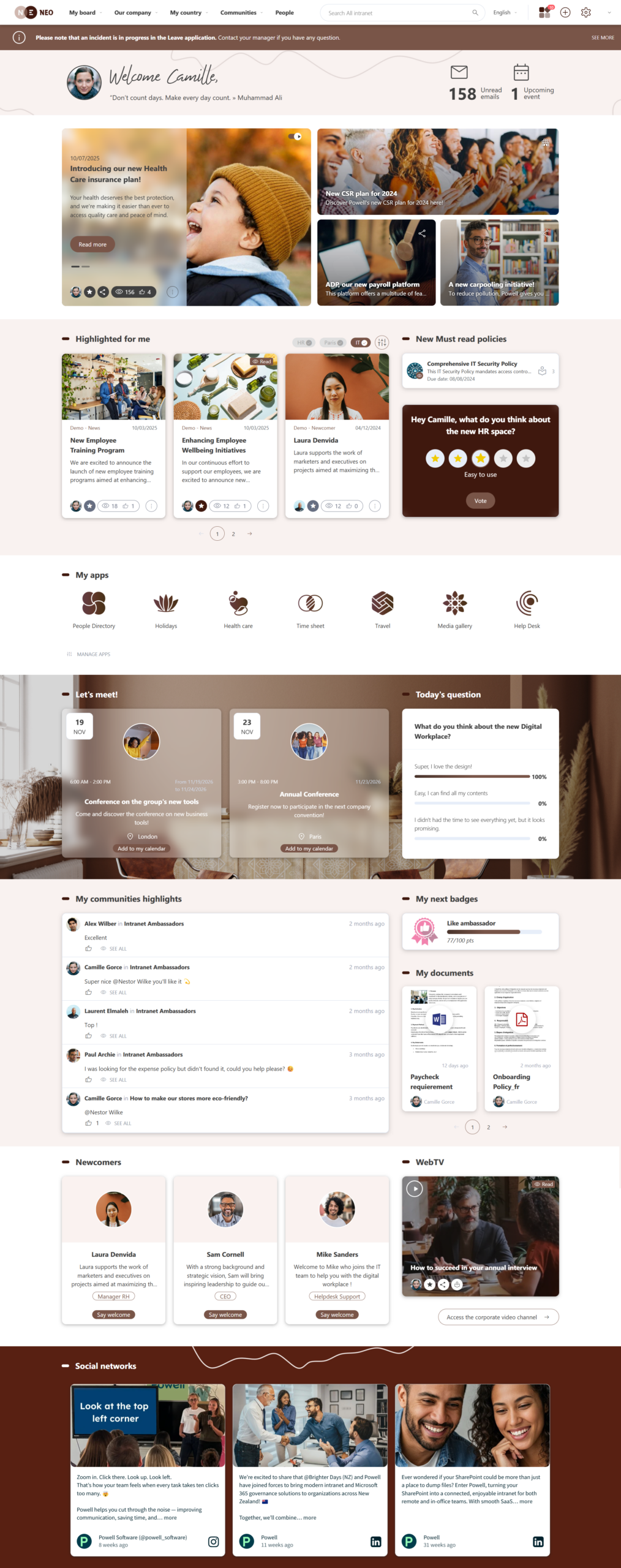
The homepage is the most consequential design surface in any intranet. It sets the first impression, establishes navigation patterns, and, if it’s well designed, becomes the place employees start their day. The average employee spends 9.5 minutes per session on an intranet (Social Edge Consulting). The intranet homepage template needs to earn that session every single day.
A high-performing intranet homepage template is organized around four content zones:
The 4 zones of a high-performing homepage
→Zone 1 — Daily basics: quick links, search bar, notifications, and shortcuts to the most-used tools. This is the zone that determines whether employees return tomorrow.
→Zone 2 — Company news: a curated news feed with recent announcements, leadership communications, and company-wide updates. The most relevant, for this employee, right now.
→Zone 3 — Department updates: content personalized to the employee’s role, team, or location. A frontline retail employee and a finance analyst should not see identical homepages.
→Zone 4 — Engagement and social: events calendar, recognition feeds, polls, photo galleries. This is where intranet design and company culture intersect.
As Eric Wagstaff, Senior Director of HR and Retail Support at Brown’s Shoes, described SoleTrain: the visual events calendar, polling, and photo gallery ‘brought us together and strengthened connections.’
What not to put on a homepage: competing calls-to-action, outdated content, department-specific links irrelevant to 80% of the workforce, or, above all, no search bar. Role-based personalization is the single feature that separates a good homepage from a great one.
Real intranet template examples: what Powell clients built on SharePoint
Theory produces frameworks. Real numbers produce decisions. Here is what two organizations actually built, and what happened when their employees showed up.
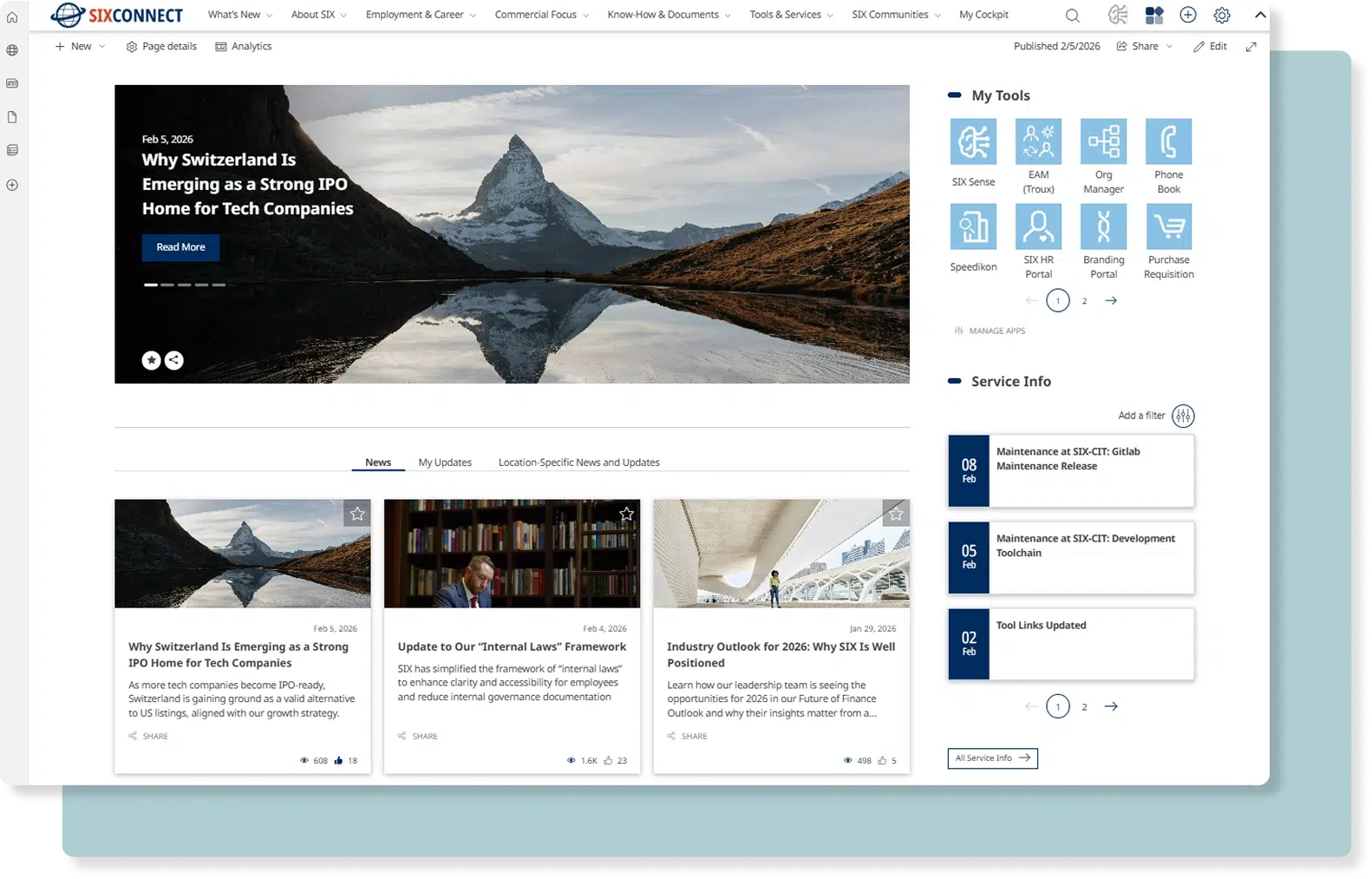
SIX Connect : financial services, 5,600 employees, 19 countries
SIX, the Swiss financial infrastructure group, entered the project with a custom Drupal intranet that had become difficult to maintain, slow to navigate, and impossible to integrate with Microsoft 365. The challenge at this scale — a multilingual, globally distributed workforce in a regulated industry — is not just design. It’s relevance: making content feel local to an employee in Zurich without making it invisible to one in Singapore.
The approach: a SharePoint + Powell layer, location-specific content pages, intuitive navigation, and AI-powered search.
The Template of SIX Connect :
Six Connect intranet Home page using Powell Intranet
“
For the first time, SIX Connect brings our global workforce together by making relevant information easy to find and locally meaningful, while still reinforcing a shared identity and direction across the company.
Claudia Holfert Head of Communications — SIX Connect
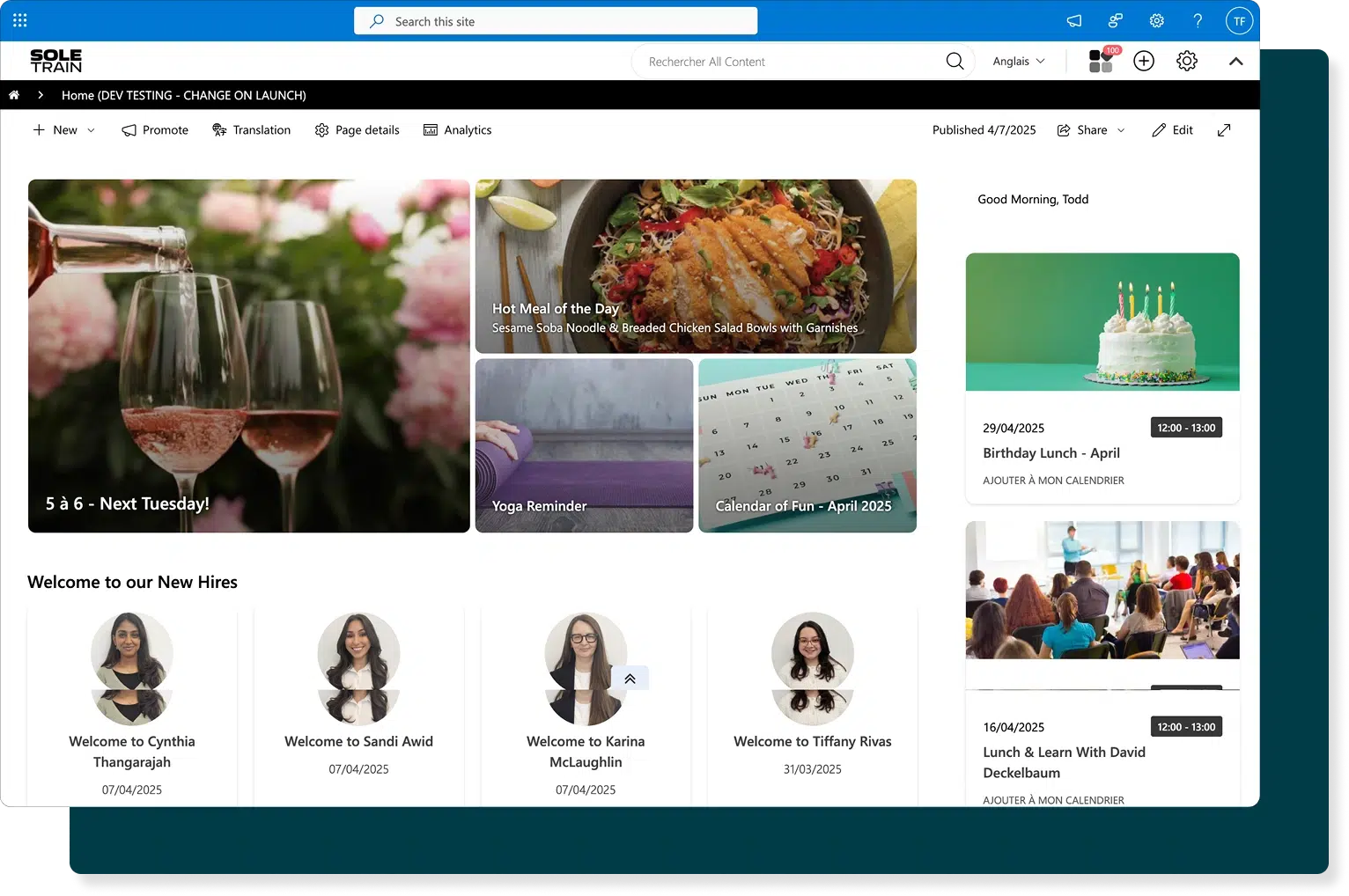
Browns Shoes had a fragmented digital workplace: communication silos, no mobile access for frontline staff, and a patchwork of tools that didn’t talk to each other. The intranet project brief was clear: create a single digital home that would work for a head-office employee in Montreal and a store associate in Vancouver.
The approach: a branded home site built with Powell Intranet templates on SharePoint, supplemented by department and function-based sites, and a bilingual French/English architecture deployed without developer dependency.
Template of Brown Shoes :
Brown Shoes intranet Home page using Powell Intranet
“
Every event, activity, news item, policy update, or corporate communication is first seen on SoleTrain.
Eric Wagstaff Senior Director of HR and Retail Support — Browns Shoes
Results of Brown Shoes :
88% user adoption (up from 35%)
45% of sessions on mobile
−30% time to find documents
−25% email volume
The decision to use a role-based homepage template with a mobile-first structure directly contributed to the adoption result.
Beyond the homepage: department, HR, and specialty page templates
You may be curious about what an intranet is. To start, it’s not one page with ambition. It’s an ecosystem of purpose-built templates that cover every employee need.
Template type
Primary users
Key features
Department hub (IT, HR, Finance, Marketing)
Department members + cross-functional
Team announcements, resources, project links, contact directory
Searchable FAQs, how-to guides, documents, version control
The HR hub deserves special attention: it is typically the most-visited department section on any intranet, and the one with the highest cost of failure. When an employee can’t find the parental leave policy or the expense submission form, they call HR. Multiply that across a 2,000-person organization and you have a significant operational overhead that a well-structured HR template eliminates at the source.
Good intranet information architecture across all these templates means employees don’t have to think about where to look. They just find what they need.
How to choose and implement an intranet template
Picking the right template is half the work. According to Simpplr’s 2024 State of the Intranet report, 95% of organizations with well-designed intranets report significant productivity gains. The operative phrase is ‘well-designed’, which includes both the template and what happens after launch.
Define your objectives and primary use cases. Before opening a template catalog, identify what the intranet needs to do. Is the primary driver employee communication? HR self-service? Knowledge management? IT support? The use case determines the template priority.
Audit your existing Microsoft 365 stack. If SharePoint is already deployed, you’re building on an existing foundation. Identify what’s in use, what’s duplicated, and where information is currently stranded.
Choose based on four criteria: platform compatibility with Microsoft 365 and SharePoint Modern; scalability; UX quality and mobile responsiveness; and governance built into the template architecture.
Deploy in phases. Start with the homepage and two department sites. The how to build an intranet framework recommends a phased approach for this reason. Get adoption data before expanding.
Measure adoption from week one. Track session duration, search volume, and login frequency. Define content owners per template before launch; governance gaps are where intranets go to stagnate.
The custom intranet vs template question is worth asking honestly: most organizations at 500-5,000 employees gain more from a well-implemented template than from a bespoke build that takes three times as long and costs significantly more.
Frequently asked questions
What should be included in an intranet template?
A well-structured intranet template should include a homepage with quick links, search, and a news feed; department pages with role-specific content; an HR hub for policies, benefits, and onboarding; and a news center for internal communications. Navigation should follow the 3-click rule: any content, reachable in three clicks or fewer.
What is the best SharePoint intranet template?
The best SharePoint intranet template is one built natively on SharePoint Modern, not layered on top of it, with Microsoft 365 integrations, role-based personalization, governance controls, and mobile responsiveness. Powell Intranet’s template catalog includes 40+ ready-to-deploy options, with measurable adoption results from clients across retail, finance, and global enterprise.
How do I design an intranet homepage template?
Start with the four content zones: daily basics (quick links, search), company news, department updates, and engagement content. Apply role-based personalization so employees see relevant content. Prioritize mobile-first layout. Keep the visual hierarchy clear and resist the urge to fill every pixel; negative space is what makes navigation feel easy.
What is the difference between a template and a custom intranet?
A template is a pre-built, configurable structure that can be deployed quickly and customized without developer work. A custom intranet is built from scratch, which offers more control but requires significantly more time, cost, and technical resource. For most organizations with 500-5,000 employees on Microsoft 365, a well-implemented SharePoint-native template delivers faster ROI with lower risk.
How long does it take to launch an intranet with a template?
With a SharePoint-native template like those in Powell Intranet’s catalog, organizations can typically move from template selection to live deployment in days to weeks, compared to months for a custom build. The timeline depends on branding customization, content migration, and governance setup, but the absence of development dependency is the primary accelerator.
The blank SharePoint canvas is a solvable problem. A well-chosen intranet template, deployed on a SharePoint-native platform with proper governance and a phased rollout, transforms an underused Microsoft 365 asset into the digital center of your organization.
At Powell, we believe the intranet is more than just another tool. It’s the foundation of a high-performance workplace, where teams feel connected, productive, and part of a bigger vision.
This vision is what led Pierre-Eric Jacoupy to join Powell as Chief Product Officer (CPO).
View his LinkedIn pr...
Powell is proud to have been recognized by ClearBox with two 2026 badges: Best for value and Leading product. These distinctions highlight what Powell is built to deliver: a powerful, accessible, and human-centered intranet experience that helps organizations turn Microsoft 365 complexity into a dig...